Trend Report SS27 — paid,
ticketed, scanned.
A bilingual event site with a self-built ticketing system for a two-day hair-trends seminar in Sofia. Card payment to QR ticket with no human in the loop — and door control that runs on a plain phone camera.
Visit the site ↗
The brief.
TREND REPORT SS27 is a two-day hair-trends seminar — nouhau School × The Global Hair Collective, Sofia, 24–25 January 2027. A closed room and a professional audience: salon owners, stylists, educators, students. The event had a print flyer and a date. It had no website, no way to buy a ticket, and no way to check one at the door.
Off-the-shelf ticketing platforms were ruled out quickly: a fee on every sale, someone else’s brand on the ticket, and no control over how any of it looks. The client wanted the ticket to look like the flyer, in-studio sales to run through the same system, and everything to live on the shared hosting they already had. We wanted one more thing: the payment should issue the ticket by itself.
Two audiences, one QR code
- Buyers — often a salon owner buying three tickets for their team, who needs an invoice made out to the company
- The door team — people with phones, not scanners, who have to admit a hundred people in a few minutes, two days running
Every decision in the system comes back to those two groups — and to the rule that a paying customer is never left without a ticket.
Our approach.
The design starts from the event’s print flyer: a dark ground, bone-coloured type, gold accents and a single red point — the reserve button in nouhau’s own red. The site is fully bilingual, Bulgarian and English, as separate copies rather than machine translation. The tickets and staff screens follow the flyer even more strictly: wide-tracked geometric caps, no gold, set in Jost — one of the few free geometric faces with Cyrillic.
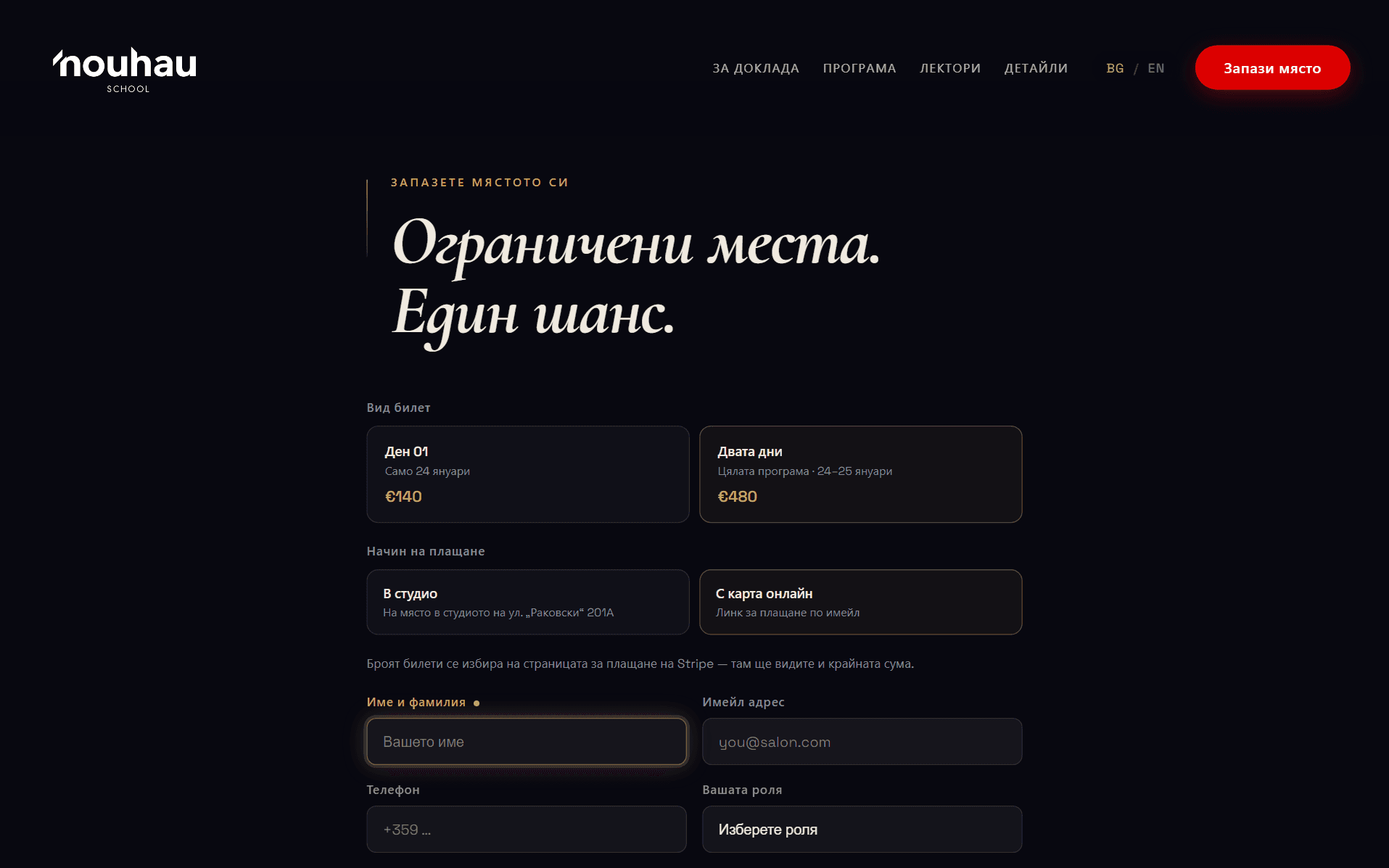
The booking form is guided. The next field to complete lights up gold with a pulsing dot and a gold outline, and the highlight walks the buyer through ticket type, payment method, quantity and contact details. An “I need an invoice” checkbox unfolds the company fields — something salons need to enter without writing an email afterwards. Validation runs in the browser and again on the server.
Two ways to pay, one kind of ticket
Card payment goes online through Stripe Checkout with Apple Pay and Google Pay. Cash is taken in the studio, where the team issues the ticket from a staff dashboard. Either way the customer receives the same ticket: a QR code, a web ticket link and a print-ready A4 PDF typeset to match the flyer.
Payment to ticket, in seconds.
The customer pays by card. The moment the payment clears, Stripe sends a signed event to the server. The system verifies the signature, issues the tickets in the database and emails them — each with its own QR code, web ticket link and PDF. Nobody opens an inbox, nobody copies anything by hand.
Defensive by design
- Verified events — every Stripe event is cryptographically verified; a forged signature or a stale replay is rejected before anything is issued
- Idempotent issuing — a retried webhook can never duplicate tickets; every ticket stays traceable to the payment that created it
- Currency and amount guards — the ticket count is derived from the amount paid and must divide exactly; a foreign currency or an odd amount stops issuing rather than issuing the wrong number
- Automatic alerting — anything that fails after the money is taken is logged and raises an email to the organiser to issue by hand. A paid customer is never left with nothing

The thank-you page after checkout shows the freshly issued tickets — and if it loads before the webhook has finished, it waits and refreshes itself. Cash sales run through a staff dashboard that issues the same tickets by hand, resends them when needed and shows the arrivals list.
Door control, with a phone camera.
Every ticket carries one QR code, and it serves two audiences. An attendee who scans it sees their own ticket. A signed-in member of staff scans the same code with their phone’s plain camera — no scanner app, no special hardware — and gets an instant door verdict.
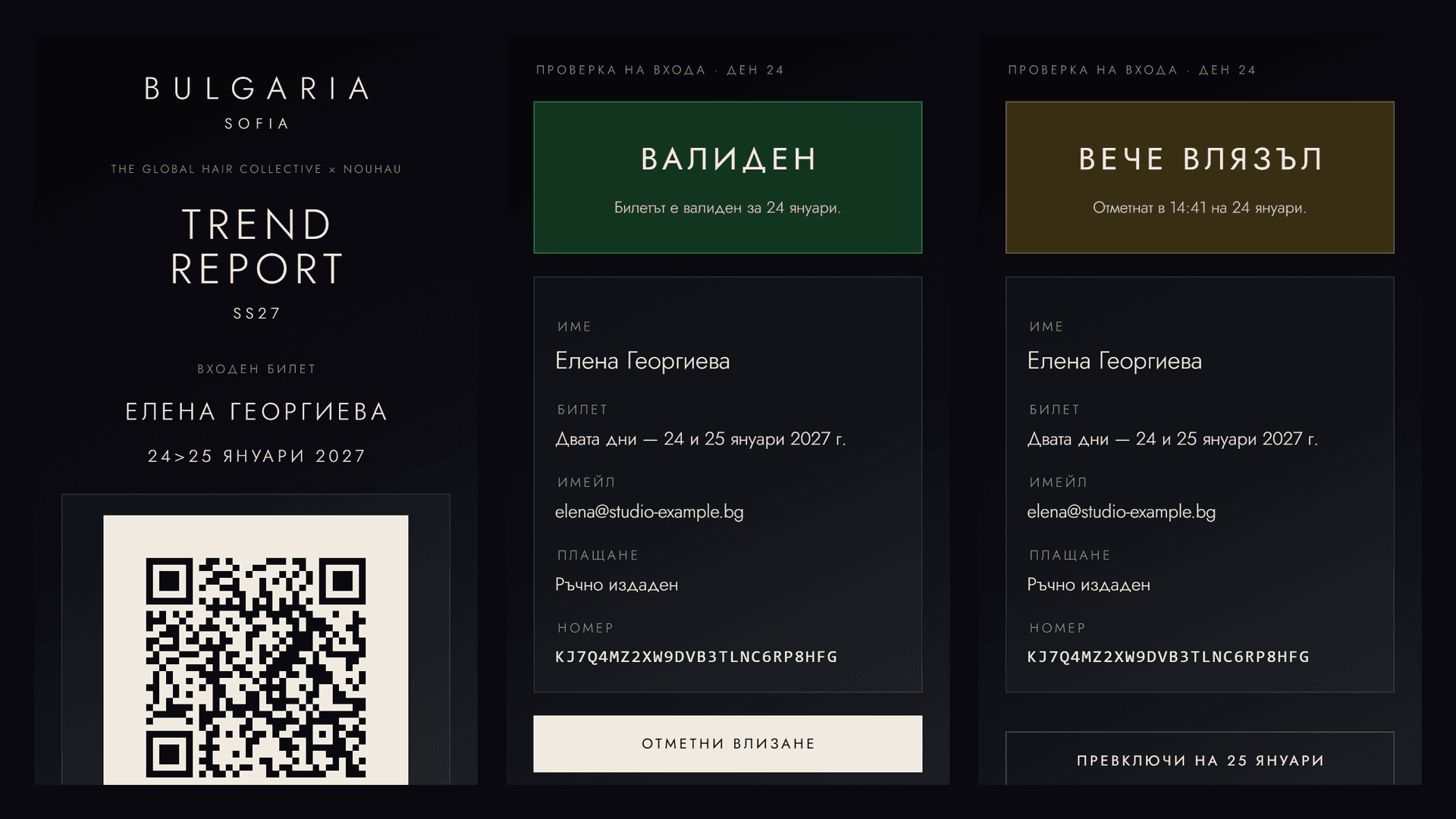
- Green — valid for today, check in
- Amber — already entered, or a ticket for the other day; staff see why, with a deliberate “check in anyway” override
- Red — invalid code, no exceptions
Check-ins are stamped per day, so a two-day pass checks in once on each day. A re-scan can never overwrite the original arrival time. A live arrivals list, searchable by name and email, backs the door team up.
What we built.
Bilingual event page
Programme, venues, presenters, prices and terms in Bulgarian and English — built from the print flyer, with a separate copy per language.
Guided booking form
The next step lights up gold: ticket type, payment, quantity, contact details. Invoice data for salons, validated in the browser and on the server.
Stripe payment that issues itself
Card, Apple Pay, Google Pay. The signed webhook issues and emails the tickets in seconds — verified, idempotent, with amount and currency guards.
QR, web ticket and A4 PDF
Every ticket has its own QR code, web page and print-ready PDF, typeset in Jost to the flyer — with the gold deliberately left out.
QR entrance control
Green, amber, red — from a plain phone camera. Per-day check-ins, no overwriting, a live arrivals list with search.
Staff dashboard
Issue tickets after cash payment in the studio — the same QR codes and PDFs, resend on request, and the arrivals list.
The stack.
Deliberately light. The whole stack runs on the shared hosting the client already pays for — no framework, no build step, and no secret API key on the server.
- PHP 8.1 + MySQL — no framework, minimal dependencies; a single tickets table, clean URLs through .htaccess
- Stripe — Payment Links with Apple Pay and Google Pay, and signed webhook events; the only Stripe credential on the server is the signing secret
- QR + PDF — QR codes drawn as vectors, the PDF ticket generated on the server with embedded Jost fonts and the flyer’s letter-spacing
- Bilingual — Bulgarian and English across the site, tickets, emails and thank-you page; the ticket’s language follows the buyer